Are you sure you want to clear the saved questions?
Forgot to type something?
It looks like your search box is empty. If you meant to find a specific question, tap Cancel and type a keyword first.
Host Feature: Loading the entire deck at once is reserved for Hosts to quickly skim questions. Standard players should draw random cards or search keywords to keep the screen focused.
Text copied!
External Web Search
Humanize AI AnswersBypasses robotic "As an AI..." summaries
External Translation
Tip: Paste manually if the copied text doesn't appear automatically.
*Note: Curious Souls Cafe is not affiliated with these external services.
My Saved Decks
Select a saved deck to load and play immediately, or open the
Deck Builder
to edit and create new ones.
🚀 Meaningful Talk
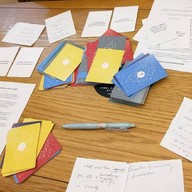
1. Gather
Bring everyone together around this screen to play locally, or pass the device when it's someone's turn.
2. Pick
Each person selects a question that resonates with them. Tap the to save it into Saved Items.
3. Start
Invite a person to share their question and answer, then everyone goes around (e.g., clockwise) answering the same question. Once done, the next person shares their chosen question, and so on.
Optional: Roll the dice and match its color to that of the question or team to start.
Note: These digital tools and our in-person gatherings are provided solely for entertainment purposes, intended to foster community connection and reflection. They are not a substitute for professional counseling or advice.
Note: These tools are provided solely for entertainment purposes, allowing for personal reflection rather than professional counseling or advice.
A warm reminder: because custom decks can be created by anyone, the questions here may have been crafted by a fellow community member and aren't necessarily affiliated with Curious Souls Cafe. Enjoy exploring!
Tip: Paste manually if the copied text doesn't appear automatically.
Digital Souvenir
Share your favorite prompt.
Graphic Preview
Long-press or right-click the image to save, or use the button below.
Delete Note?
Are you sure you want to delete this note? This action cannot be undone.
Delete Note & Unsave?
This item contains a personal note. Removing it from your collection will permanently delete your written reflection.
Heads-up: How Your Notes are Saved
Notes and Saved Items are stored unencrypted in your browser's local
storage. For privacy, please clear data before sharing this device.
And this data is subject to loss if you clear your browser's cache,
change devices, or if the browser decides to delete it.
We recommend regularly backing up your data by exporting it via the
"Menu" (Settings) page.
💡 Question Saved
Tapping the star
saves the question
to the "Saved Items" section at the bottom of the app. This makes it
easy to keep track of questions you want to discuss.
To remove a question, simply tap its star again, or find it in the
Saved Items section, tap it, and click "Clear Selected".
It looks like you don't have any custom decks loaded or saved right now. Head over to the Deck Builder to write, generate, or paste your first set of questions!

👋 Stay Connected