Restore all dice and custom color settings to defaults?
Delete Preset
Are you sure you want to delete this preset?
Oops!
Save Preset
Give your custom setup a name:
Name already exists!
Do you want to overwrite the existing preset or cancel?
This area is advanced❗
Friendly Reminder: The virtual question cards are
pre-defined in three fixed colors:
Blue
Yellow
Red
Any changes here will only affect the dice. These changes will not
alter the number of question card colors available.
⚠️ This
will be shown once only.
2 Ways to Use the Dice
Option 1: Reveal & Match (No Teams)
No teams? No problem! The colors on the dice
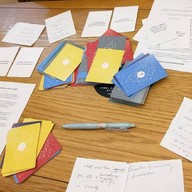
match the border colors of the cards in our Conversation Decks.
Have everyone pick a card, tap to reveal its color, and roll. If
the dice matches your card's border color, you start! (If no
match, the roller picks).
Option 2: Team Colors
Group participants into Blue, Yellow, or Red teams. Roll the
dice to decide which team's questions go first.
Challenge Mode (Optional)
Toggle Challenge for a chance to roll a
"Striped" face. If you get one, you must do a dare!
Scan the QR code below to quickly share or access this page:
|
Let's help fellow curious souls launch this page and start the
conversation! 😊
Privacy &
Transparency
1. Data Privacy (Local First)
This application operates client-side. We do not
store your custom dice colors, settings, or personal data on our
servers. All preferences are saved using your browser's
Local Storage device memory.
2. Third Parties
To provide functionality, this app connects to:
Google Fonts / CDNs: Used to load styling and
icons.
Please note: The
privacy notice and terms outlined here apply specifically to this
page. For the full, comprehensive Privacy Policy and Terms of
Service governing our platform, please refer to those on our
main page.